FORPSI offers together with its webhosting services the automatic application installer Softaculous.
For using this service it is necessary to have a service using a server with Linux OS, installer can be activated on the selected subdomain.
Do you know how to set up a subdomain for your web? Read
our guide.
Softaculous can be started from the Webhosting tab, click the "Installer" and then button "Open installer application".

The Softaculous interface will open, in the right column you will see structured topics with offered applications, in the middle of the page there is a selection of the most popular scripts and in the upper left menu you will find icons for the interface management.
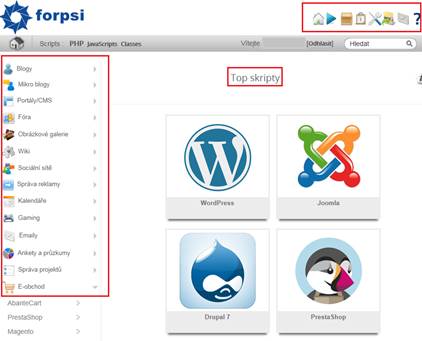

= application demos

= overview of the installed scripts

= Softaculous management settings

= management of backups for installed applications
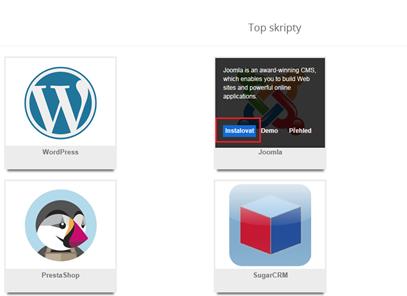
Once you select the desired application, simply click "Install" on its icon.
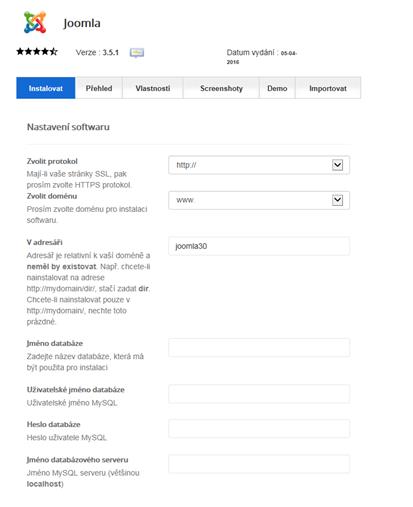
In the following form simply fill in the details for management and configuration - The domain name, database details (name, user name, password, name of db server):
Likewise fill in the details regarding the account administrator (name, password, email):
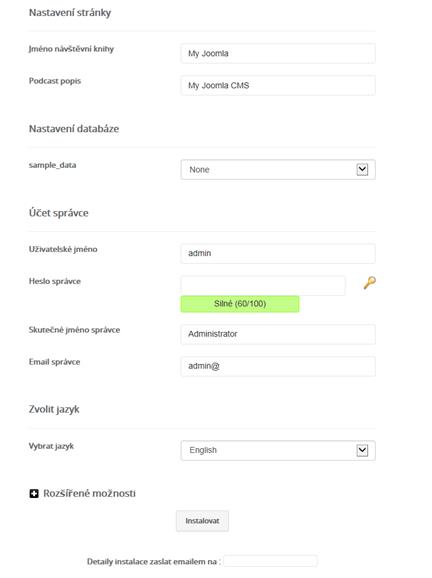
After filling in all the details required, an automatic installation of the selected CMS will start.